A frame, a spare card, your dashboard
Rotate the exterior and switch the sample calendar on or off. The loose card illustrates the spare-card approach, not a verified slot location.
Interactive render — not a photo or hardware proof. Approximate exterior, not measured CAD. Sample data, no live calendar.
Explore the shape and a sample interaction in 3D.
Loads only when requested. No external assets or device connections.
Reference photos & screenshots
These are credited source images, not Hackshop's own finished builds. Read the scope below each image.
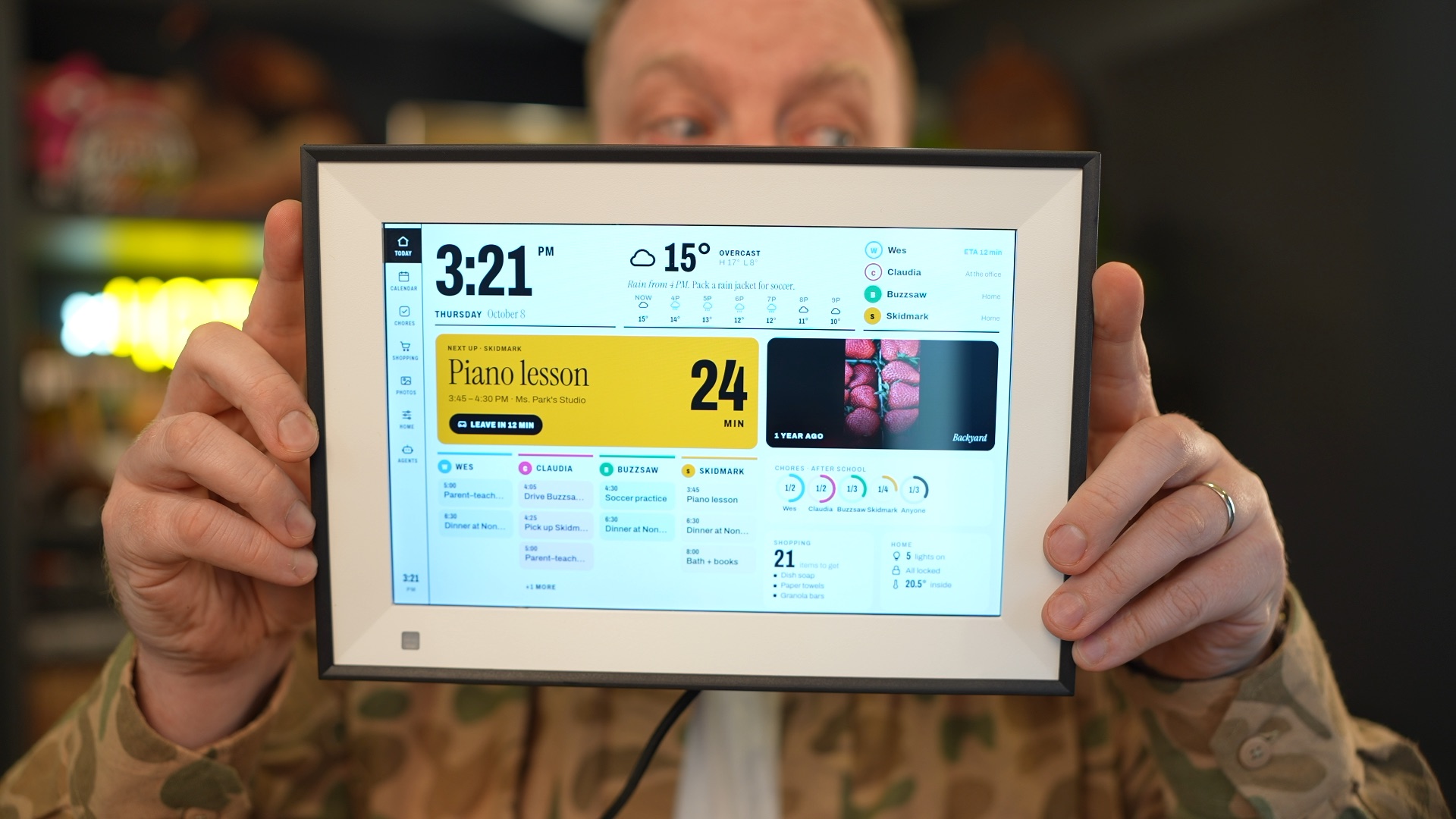
Related build: Wes Bos's family dashboard
Physical BIUFRAME running Android, not the Linux PF1007L build. Included as a related dashboard reference, not proof of this guide's installation.
Wes Bos · Source · MIT. Unmodified original documentation photograph. Copyright 2026 Wes Bos; MIT notice included.
Creator demos & walkthroughs
Short demos are not complete how-tos. Videos stay with their creators through the original platform's player; no clip is copied to Hackshop.
Creator demo: Omarchy on an Allwinner frame
Short creator-posted demonstration of the microSD Linux project, not a step-by-step install or an independent Hackshop test. See the pinned guide for exact board and recovery limits.
Related walkthrough: Jailbreaking a $50 photo frame
Wes Bos's longer Android BIUFRAME walkthrough. Different Rockchip hardware: do not use its flashing instructions for the Allwinner PF1007L Linux route. The title's price is historical, not a current quote.
Related walkthrough: Jailbreaking a $50 photo frame
Loading this player connects to YouTube. No third-party player or thumbnail is loaded until you choose it.
Still missing: An exact PF1007L Linux installation and recovery walkthrough, and a separately licensed finished-build photograph, are still missing.
Reusing an asset? Check its individual license and attribution first. Native video embeds do not grant download or editing rights. Media manifest for people & agents · Copyright notices · Original MIT-licensed render geometry.
The Omarchy frame project documents a Linux web-view route for the Humblestead HM-PF1007-BK / EFERCRO PF1007L with an Allwinner A33. It is a specific experimental target, not a universal photo-frame image. The existing Android route remains a separate option.
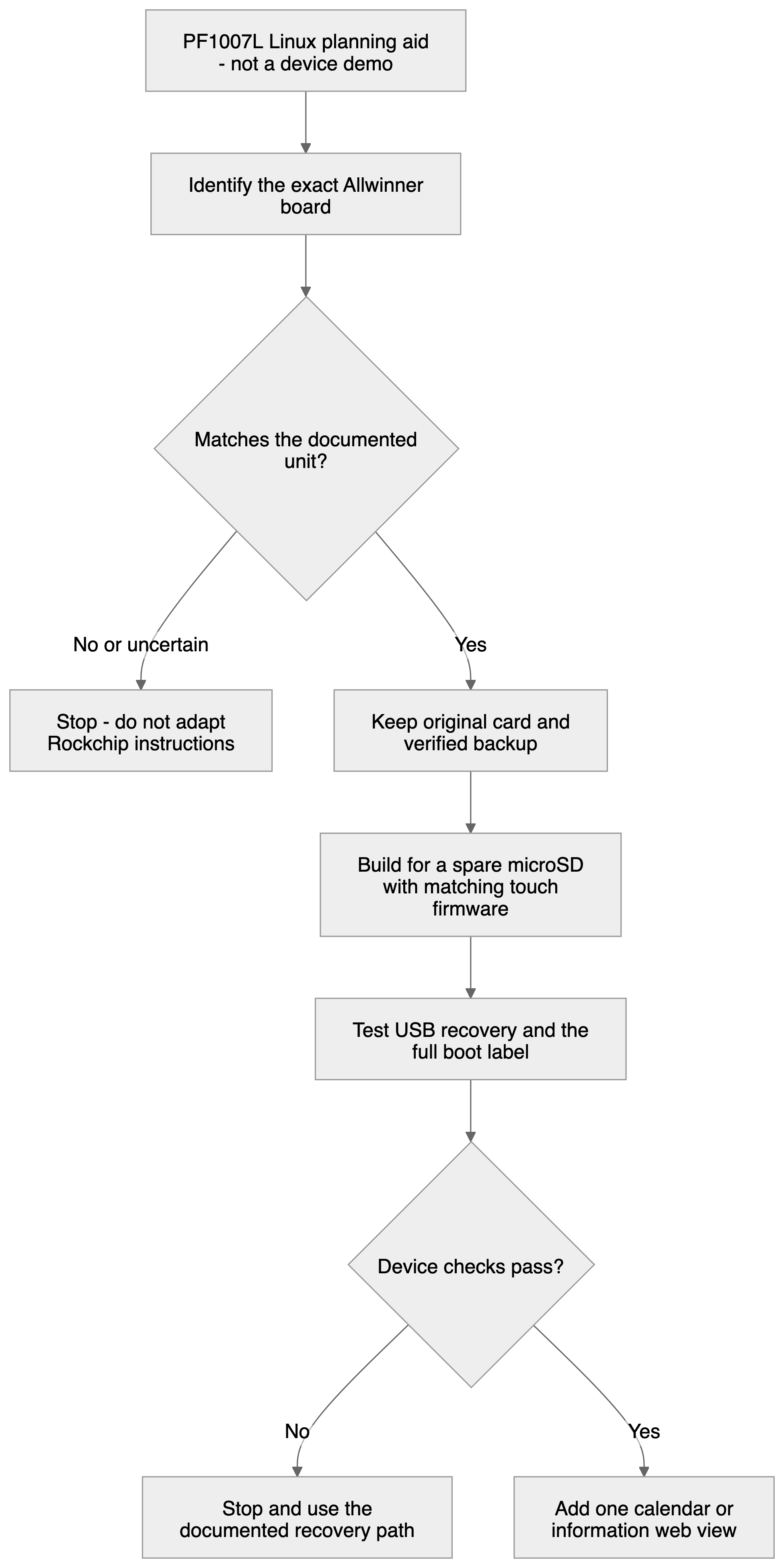
Before a write
- Identify, do not infer from the listing. Compare the board and display, touch and radio components with the pinned README. Rockchip BIUFRAME instructions do not apply. Unknown identity means stop.
- Preserve recovery. Keep the original card, a verified backup and a separate blank microSD. Read the restore guide first. Do not overwrite internal eMMC or copy a sample disk identifier.
- Use the correct inputs. The build needs the matching proprietary touch firmware from the owner's original backup. It is not included in Git. Preserve private keys, device identifiers and backups outside public repositories.
- Make a separate write decision. Inspect the project writer's checks, the exact removable disk and its byte count before approving a card write. Never alter guards to make an unknown unit pass.
Prove the base before the dashboard
Follow the pinned project's sequence for recovery access and the usable boot label before desktop provisioning. The source distinguishes an author-reported working installation from an original image-builder run validated in QEMU. A fresh image still needs testing on the exact frame. A successful build or emulator boot does not prove its display or recovery path.
A useful first design
Start with one read-only calendar or household status page. Use large text, a last-updated time and an offline state. Test readability, touch, wake, reboot and recovery before mounting it. Add power, a card and mounting to the budget; no current compatible seller price is verified here. Keep remote-AI credentials on a trusted backend. Local dictation in the source uses audio from a Mac, not a verified built-in microphone.
Walkthrough status
No Hackshop real-device video or finished-build photo is available. A future walkthrough should show the exact board, a cold boot, an actual calendar update and recovery. This diagram is not that footage.
Return to the PF1007L library entry.
Sources checked October 20, 2026
- Pinned Omarchy frame README and evidence limits
- Pinned restore and spare-card guide
- Pinned hardware-status observations
- Image-builder validation versus physical testing
- PF1007L identity and original Android paths
Original Hackshop text and diagrams. Reference photos and app screenshots above are individually licensed and credited; creator videos use consent-based native embeds. The interactive Three.js scenes are original illustrative renders, not physical proof. See the public media manifest for reuse terms.